
See your time.
Shape your life.
Tactido is a focus timer and session tracker built around activity blocks.
One tap
Start instantly.
Second tap
Expand sessions when you need context.
Add notes, tasks, links, screenshots, or plans to any block.
Private by design
No ads. No sign-up needed to start.
Your core activity data is encrypted on your device.

 iPhone

 Android
- Works from the first second.
- Nothing to configure. Ever.
- Core activity data stays on your device.
How it works
Three taps. That's the whole system.
Pick a block
Create an activity once, and it stays there. Start it with one tap. Pin your favorites for instant access.
Tap to stop
Your session is saved automatically. Forgot to start? Add time later in seconds. No lost work.
See your day
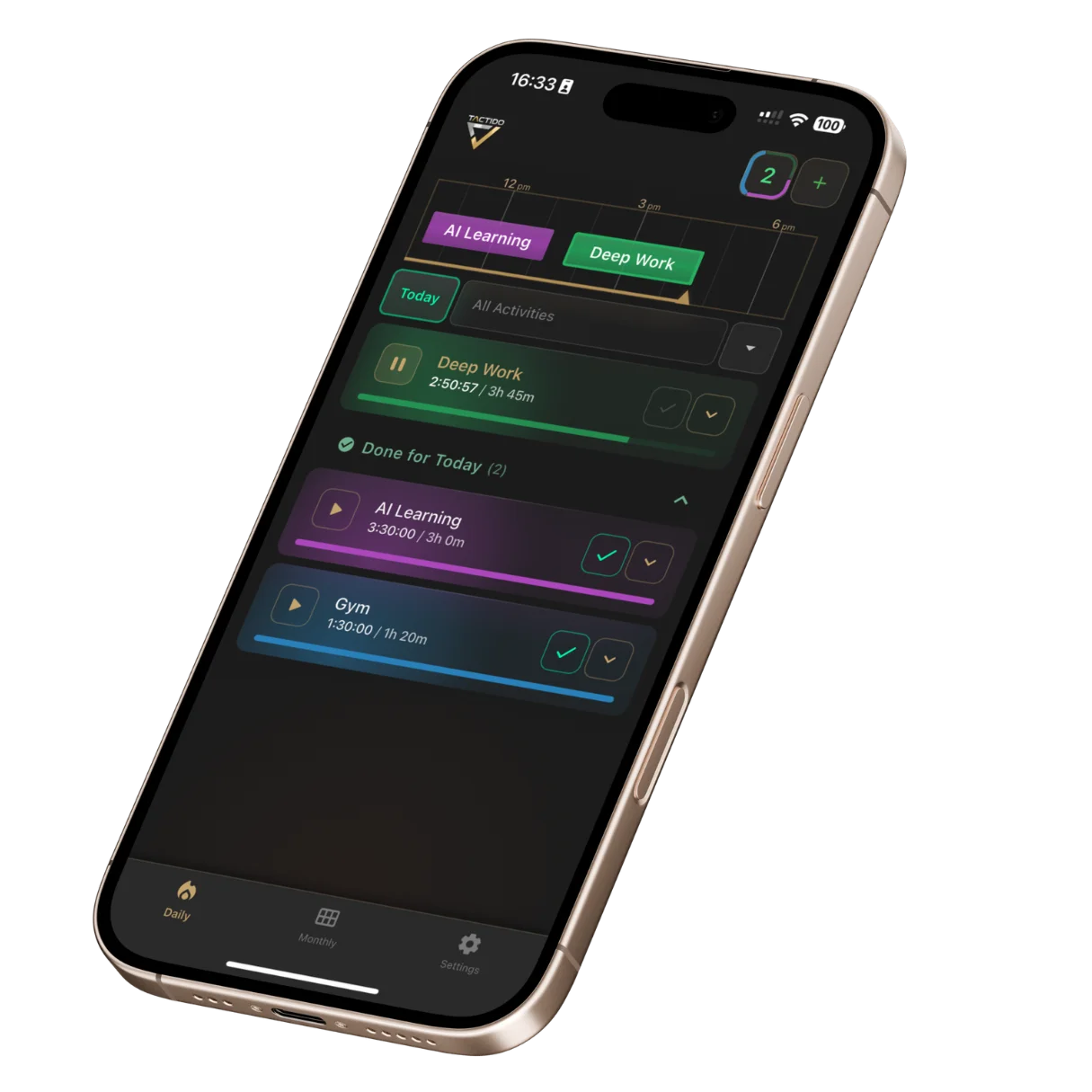
Your sessions appear as simple blocks from morning to night. Clear. Visual. Easy to understand.
Time feels different than it looks.

You may feel like the day was productive. The timeline shows what actually happened.
Hours of focused work, time spent switching between tasks, moments that disappeared faster than expected. The difference is not criticism. It is clarity.
Each block represents real time, nothing more, nothing less. No judgment. Just a clear picture of your day.
Private by design
AES-256 encryption protects your core activity data on your device. There are no ads. Optional sign-in, subscriptions, cloud backup and diagnostics are described clearly in our Privacy Policy.
Privacy isn't a feature you turn on. It is built into the core experience, with a clear choice for optional services.

Your activities, ready when you are.

You do not want to rebuild the same task every day. In Tactido, each activity becomes something you can return to instantly.
Open the app. Tap. Start working.
When you need more context, expand the activity and everything connected to it is there. Your workflow stays simple and ready.
Meeting coming up? See the travel time before it starts and set a departure alarm in seconds, so you are never late.


A workspace inside every activity.

Work rarely lives in one place. A note from a call. A screenshot. A quick task list.
In Tactido, everything stays inside the activity where it happened.
Open the block and the full context is there: notes, links, tasks, screenshots. No switching between apps. No lost details.
When you come back later, everything is exactly where you left it.

Monthly totals. Real numbers.

Projects outside your regular routine take time. Preparing for an exam. Building a side project. Renovating a room. Learning a new language.
The calendar view shows how much time you actually invested. Filter by activity and see the full month at once. No assumptions. Just measured hours.
Activity filtering and the full-year summary come with the Power User upgrade.

What is Tactido?

Tactido is a focus timer and session tracker for iPhone and Android designed for real daily work.
It helps you measure focused sessions, review patterns over time, and keep related information organized around each activity.
From deep work to personal projects to training sessions, everything is tracked clearly and stays connected to context.
Free to use, with an optional Power User upgrade for extended history and advanced filtering.

Who is Tactido for?
Tactido is for anyone who wants clarity about how they spend their time.
If you often feel busy but cannot clearly explain where your hours went, a visual timeline makes it visible.
If you work in focused sessions and want to know how many real productive hours you completed, Tactido measures your focus without adding complexity.
If you manage your own projects and need to understand how long things actually take, you can review patterns across weeks and months instead of guessing.
If your perception of time shifts during the day, the visual timeline becomes a reliable external reference.
If you are tired of complicated productivity systems and just want a focus timer that works instantly, open the app, tap once, and start.
Tactido is built for people who want structured time tracking without complexity.


Tactido vs Toggl, Clockify and RescueTime
Looking for a simpler alternative to Toggl, Clockify, or RescueTime? Tactido is built for fast personal focus sessions, persistent activity blocks, and a visual daily timeline. No sign-up is needed to start and there is no complex setup. Just clear session tracking from the first tap.
| Feature | Tactido | Toggl Track | RescueTime | Clockify |
|---|---|---|---|---|
| Time to first session | Instant | Minutes | Minutes | Minutes |
| Sign-up required to start | No | Yes | Yes | Yes |
| Setup | Zero | Required | Required | Required |
| Data on device | Yes | No | No | No |
| Retroactive time entry | Yes | Yes | No | Yes |
Tactido vs Toggl Track
Toggl is designed for teams, reporting, and client billing workflows. Tactido focuses on individual focus sessions and visual time clarity without requiring account setup before you start.
Tactido vs Clockify
Clockify is project-centered and team-oriented. Tactido is activity-centered, with persistent blocks and built-in context for personal productivity.
Tactido vs RescueTime
RescueTime runs automatically in the background. Tactido is intentional manual time tracking. You start and stop sessions consciously, so every block represents deliberate work.
If you are searching for a simple time tracking app or a focused alternative to complex productivity systems, Tactido keeps the experience fast and clear.
Frequently Asked Questions
Is Tactido right for me?
If you've ever wondered where your time actually went — yes. Tactido is for anyone who wants a clearer picture of how they spend their days, without the overhead of a complex productivity system. You don't need a workflow, a system, or a reason. Open the app, tap an activity, and start. If you work in focused sessions, study, freelance, manage personal projects, or simply want honest data about your own time — Tactido was built for you.
How is Tactido different from a Pomodoro timer?
Pomodoro forces fixed 25-minute intervals. Tactido lets you run sessions of any length, whether 8 minutes or 3 hours. You start when you start, stop when you stop. No rigid structure imposed on your workflow.
Can I add time retroactively?
Yes. Forgot to start the timer? You can add a session after the fact with exact start and end times. Retroactive time entry means you never lose data just because you forgot to tap.
What are persistent activities?
When you create an activity in Tactido, it stays on your home screen as a permanent button. No need to search, re-type, or configure every time. One tap to start your usual activity. This is what makes Tactido faster than any other timer.
Is Tactido free?
Yes. Tactido is free to download and use with no limits on core features: timer, timeline, activities, notes. The optional Power User upgrade unlocks the 24-hour clock view, timeline history charts, calendar activity filtering, and the yearly summary.
What is the Power User upgrade?
Power User is an optional upgrade that unlocks four features: the 24-hour clock view of your day, timeline history charts, activity filtering in the calendar, and the yearly summary view. Plans: $1.29/week, $2.99/month, or $9/year (best value). Every plan includes a 7-day free trial. Cancel anytime.
Does Tactido collect my data?
Your core activities, notes and photos are stored on your device using AES-256 encryption. Tactido also uses the services described in the Privacy Policy for subscriptions, optional sign-in or cloud features, and diagnostics when enabled.
Can I see monthly totals and statistics?
Yes. The calendar view shows monthly sums per activity. Filtering by specific activities and the full-year summary are part of the Power User upgrade.
What platforms does Tactido support?
Tactido is available on iPhone (iOS 16.1 or later) and Android (7.0 or later). Download it from the App Store or Google Play.
Can I share my activity progress with friends?
Yes. Tactido lets you share your activity summaries in multiple formats: PDF, PNG image, Excel or CSV spreadsheet, and plain text. Send your progress to friends, colleagues, or keep it for your own records.
Can I export my data from Tactido?
Yes. You can export all your time tracking data in JSON format. Go to Settings, open Backup & Restore, tap Manage, create a backup and share it as a .json file.
Why track your time?
Because your memory lies. You remember "a productive day" but forget the 90 minutes of scrolling. You remember "studying all weekend" but can't say how many focused hours that actually was. Perception and reality diverge, every single day.
Measured time is different. Fourteen hours of study isn't "a lot." It's fourteen, measured. Three hours of deep work isn't a guess. It's a fact. When you track sessions, you stop negotiating with yourself about whether you did enough. The data speaks.
This isn't about productivity guilt. It's about generating honest data about yourself, by yourself. No coach, no manager, no app judging you. Just a record of how your time actually went.
Built differently.
- Built for one person
- No teams. No managers. No dashboards. Just you and your time.
- Calm by design
- The streak badge is optional and can be switched off. It celebrates consistency, not perfection. No leaderboards. No guilt scores. Nothing nagging you to perform.
- Instant start
- Zero seconds of onboarding. Open the app. Tap an activity. You're tracking.
- Depth when you need it
- Core: a name and a timer. Everything else (notes, links, photos, todos) is optional and hidden until you want it.
- Honest design
- No dark patterns. No manipulation. No "rate us" traps.
- Zero ads
- No banners. No sponsored content. No one paying to reach you.
- Your data, your device
- AES-256 encryption protects core activity data on your device. Optional cloud and account features are always explained in our Privacy Policy.
- Clear over complex
- No project hierarchies. No nested systems. No configuration layers. Just sessions you can see and understand.
- Real time, not assumptions
- Manual start and stop. Every session is intentional. What you see on the timeline is what actually happened.
Start your first session now
Free. Works instantly. No sign-up needed to start.